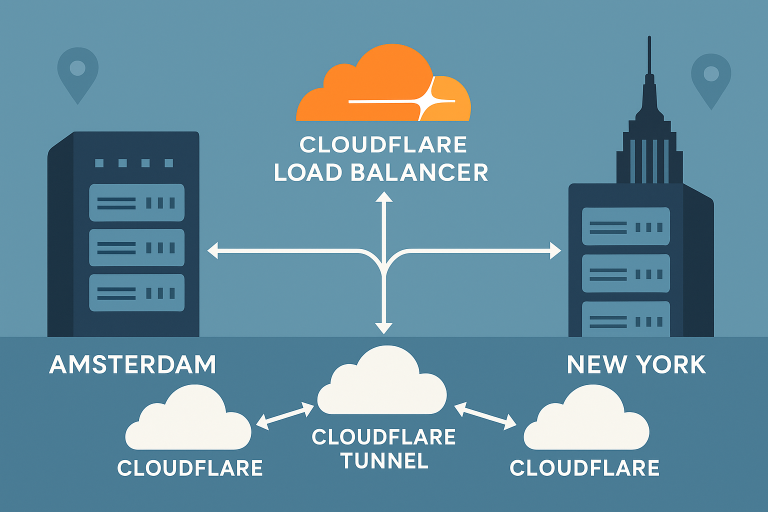


Building a multi-region OpenSearch cluster provides enterprise-grade search capabilities with automatic failover and geographic data distribution. This comprehensive guide walks through deploying OpenSearch 2.15 across Amsterdam VPS and New York VPS nodes with advanced features including cross-cluster replication, Index State Management (ISM) policies, S3 snapshots, and security hardening.
By distributing your search infrastructure across two highly-connected regions, you’ll achieve sub-50ms query latencies for users in both Europe and North America while maintaining data consistency and disaster recovery capabilities.
Prerequisites
Before starting this deployment, ensure you have:
- 4 VPS instances: 2 in Amsterdam (8GB RAM, 4 vCPUs) and 2 in New York (same specs)
- Ubuntu 24.04 LTS installed on all nodes
- Root SSH access to all servers
- S3-compatible storage for snapshots (AWS S3, MinIO, or similar)
- Domain names for TLS certificates
- Basic understanding of distributed systems and elasticsearch concepts
This tutorial requires approximately 32GB total RAM and 200GB NVMe storage distributed across your VPS fleet.
Step 1: System Preparation and Java Installation
Begin by updating all nodes and installing OpenJDK 21, which provides optimal performance for OpenSearch 2.15:
# Run on all 4 nodes
sudo apt update && sudo apt upgrade -y
sudo apt install -y openjdk-21-jdk curl wget gnupg2
Configure system limits for OpenSearch:
# Add to /etc/security/limits.conf
echo "opensearch soft memlock unlimited" | sudo tee -a /etc/security/limits.conf
echo "opensearch hard memlock unlimited" | sudo tee -a /etc/security/limits.conf

# Configure vm.max_map_count
echo "vm.max_map_count=262144" | sudo tee -a /etc/sysctl.conf
sudo sysctl -p
Step 2: OpenSearch Installation and Basic Configuration
Install OpenSearch 2.15 on all nodes:
# Add OpenSearch repository
curl -o- https://artifacts.opensearch.org/publickeys/opensearch.pgp | sudo gpg --dearmor --batch --yes -o /usr/share/keyrings/opensearch-keyring
echo "deb [signed-by=/usr/share/keyrings/opensearch-keyring] https://artifacts.opensearch.org/releases/bundle/opensearch/2.x/apt stable main" | sudo tee /etc/apt/sources.list.d/opensearch-2.x.list

sudo apt update
sudo apt install -y opensearch=2.15.0
Create the basic cluster configuration. For Amsterdam primary node (10.1.1.10):
# /etc/opensearch/opensearch.yml
cluster.name: multi-region-search
node.name: amsterdam-master-1
node.roles: [cluster_manager, data, ingest]

network.host: 0.0.0.0
http.port: 9200
transport.port: 9300

discovery.seed_hosts: ["10.1.1.10:9300", "10.1.1.11:9300", "10.2.2.10:9300", "10.2.2.11:9300"]
cluster.initial_cluster_manager_nodes: ["amsterdam-master-1", "new-york-master-1"]

# Cross-cluster settings
cluster.remote.connect: true
node.attr.region: amsterdam
node.attr.zone: eu-west-1
Step 3: TLS Security and Authentication
Generate TLS certificates for secure inter-node communication:
# Generate root CA
sudo /usr/share/opensearch/plugins/opensearch-security/tools/install_demo_configuration.sh -y -i -s

# Configure security settings
sudo nano /etc/opensearch/opensearch-security/config.yml
Enable security in the main configuration:
# Add to opensearch.yml
plugins.security.ssl.transport.enabled: true
plugins.security.ssl.transport.pemcert_filepath: certs/esnode.pem
plugins.security.ssl.transport.pemkey_filepath: certs/esnode-key.pem
plugins.security.ssl.transport.pemtrustedcas_filepath: certs/root-ca.pem

plugins.security.ssl.http.enabled: true
plugins.security.ssl.http.pemcert_filepath: certs/esnode.pem
plugins.security.ssl.http.pemkey_filepath: certs/esnode-key.pem
plugins.security.ssl.http.pemtrustedcas_filepath: certs/root-ca.pem
Step 4: Cross-Cluster Replication Setup
Configure cross-cluster replication between Amsterdam and New York regions:
# Register remote cluster from Amsterdam
curl -X PUT "amsterdam-cluster:9200/_cluster/settings" -H "Content-Type: application/json" -d'
{
  "persistent": {
    "cluster.remote.new_york": {
      "seeds": ["10.2.2.10:9300", "10.2.2.11:9300"]
    }
  }
}'
Create a follower index with cross-cluster replication:
{
  "remote_cluster": "new_york",
  "leader_index": "logs-2025",
  "settings": {
    "index.number_of_replicas": 1,
    "index.refresh_interval": "5s"
  }
}
Step 5: Index State Management (ISM) Policies
Implement automated index lifecycle management:
{
  "policy": {
    "description": "Multi-region log rotation policy",
    "default_state": "hot",
    "states": [
      {
        "name": "hot",
        "actions": [{
          "rollover": {
            "min_size": "10gb",
            "min_doc_count": 1000000,
            "min_index_age": "7d"
          }
        }],
        "transitions": [{
          "state_name": "warm",
          "conditions": {
            "min_index_age": "30d"
          }
        }]
      },
      {
        "name": "warm",
        "actions": [{
          "replica_count": {
            "number_of_replicas": 0
          }
        }],
        "transitions": [{
          "state_name": "cold",
          "conditions": {
            "min_index_age": "90d"
          }
        }]
      }
    ]
  }
}
Step 6: S3 Snapshot Repository Configuration
Configure automated backups to S3-compatible storage:
# Install S3 repository plugin
sudo /usr/share/opensearch/bin/opensearch-plugin install repository-s3

# Configure S3 credentials
echo "s3.client.default.access_key: YOUR_ACCESS_KEY" | sudo tee -a /etc/opensearch/opensearch-keystore
echo "s3.client.default.secret_key: YOUR_SECRET_KEY" | sudo tee -a /etc/opensearch/opensearch-keystore
Create the snapshot repository:
{
  "type": "s3",
  "settings": {
    "bucket": "opensearch-snapshots",
    "region": "us-east-1",
    "base_path": "multi-region-cluster",
    "compress": true,
    "server_side_encryption": true
  }
}
Step 7: OpenSearch Dashboards Deployment
Install and configure OpenSearch Dashboards for cluster monitoring:
# Install Dashboards
sudo apt install -y opensearch-dashboards=2.15.0

# Configure connection
sudo nano /etc/opensearch-dashboards/opensearch_dashboards.yml
# opensearch_dashboards.yml
server.host: 0.0.0.0
server.port: 5601
opensearch.hosts: ["https://localhost:9200"]
opensearch.ssl.verificationMode: certificate
opensearch.username: admin
opensearch.password: adminBest Practices and Optimization
Memory Management: Allocate 50% of system RAM to OpenSearch heap, but never exceed 32GB. For 8GB VPS instances, set -Xms4g -Xmx4g in jvm.options.
Network Optimization: Enable BBR congestion control for improved cross-region replication performance. Consider implementing the active-active VPS architecture patterns for additional resilience.
Security Hardening: Implement IP whitelisting, regular security updates, and consider CrowdSec deployment for advanced threat protection.
Monitoring Integration: Deploy comprehensive observability with OpenTelemetry, Prometheus, and Grafana to track cluster performance, replication lag, and resource utilization across both regions.
Conclusion
You’ve successfully deployed a production-ready multi-region OpenSearch cluster spanning Amsterdam VPS and New York VPS infrastructure. This setup provides enterprise-grade search capabilities with automatic failover, geographic data distribution, and comprehensive backup strategies.
The combination of cross-cluster replication, ISM policies, and S3 snapshots ensures your search infrastructure can handle both planned maintenance and unexpected failures while maintaining data consistency across continents. For enhanced performance, consider exploring regional optimization strategies based on your user distribution patterns.
This multi-region architecture scales efficiently with your growing data needs while providing the geographic distribution essential for global applications.